
OAuth 2.0 Authorisation Flows Explained
Summary
OAuth 2.0 is a framework that allows an application to access a protected resource without directly handling the user’s password. Instead of giving an application your credentials, the identity provider issues tokens that represent what the application is allowed to do.
The flow you choose depends on the type of application, whether a user is involved, whether the application can keep a secret safely, and whether the call needs to happen as the user or as the application itself.
Authorisation Code Flow
The Authorisation Code Flow is one of the most common and secure OAuth 2.0 flows. It is typically used by web applications that have a backend server.
The user is redirected to the identity provider, such as Microsoft Entra ID, Auth0, Okta, or another OAuth provider. The user signs in and consents to the requested permissions. The identity provider then redirects the user back to the application with an authorisation code. The application’s backend exchanges that code for an access token, and sometimes a refresh token.
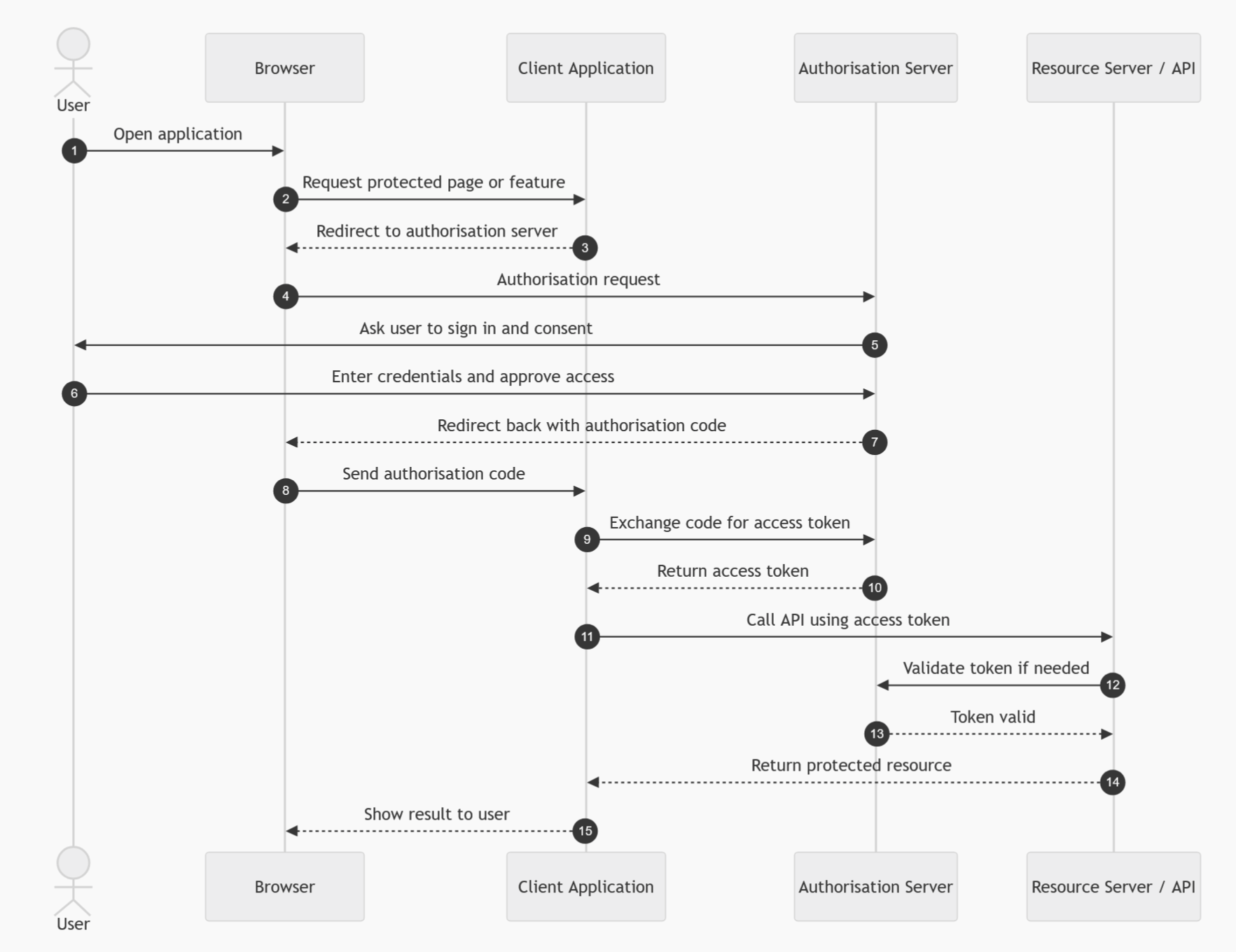
The important point is that the access token is not returned directly to the browser. The code is exchanged securely by the backend server, which can also authenticate itself using a client secret or certificate.
Use this flow when you have a traditional web application with a secure backend, especially where the application needs to access APIs on behalf of the signed-in user. Microsoft describes this flow as a way for client applications to obtain authorised access to protected resources such as web APIs. (Microsoft Learn)
Use it for
| Scenario | Fit |
|---|---|
| Server-side web application | Excellent |
| Enterprise web app using SSO | Excellent |
| App needs user-delegated access | Excellent |
| Backend can store a secret or certificate | Excellent |
Avoid it when
| Scenario | Reason |
|---|---|
| Pure frontend-only SPA without backend | Use Authorisation Code with PKCE instead |
| Machine-to-machine integration | Use Client Credentials |
| API calling another API as the user | Use On-Behalf-Of Flow |
Authorisation Code Flow with PKCE
Authorisation Code Flow with PKCE is the modern recommended option for public clients, such as single-page applications, mobile apps, desktop apps, and command-line tools.
PKCE stands for Proof Key for Code Exchange. It protects the authorisation code exchange by using a temporary secret generated by the client. The client creates a code verifier and a transformed code challenge. The challenge is sent during the initial authorisation request. Later, when the app exchanges the authorisation code for tokens, it sends the verifier. The identity provider checks that the verifier matches the original challenge.
This prevents an attacker from stealing an authorisation code and exchanging it for tokens.
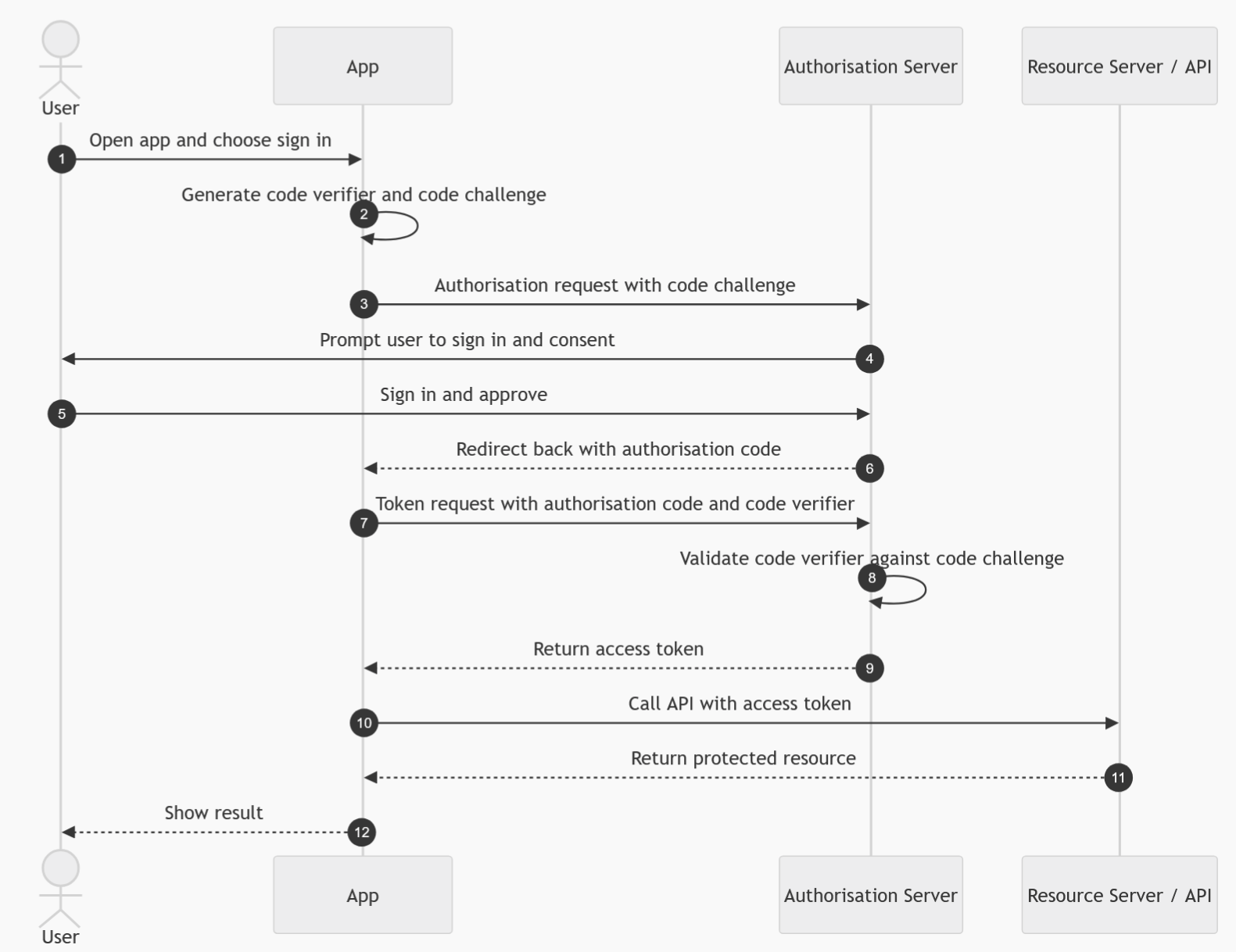
Use this flow when the app cannot safely store a client secret. This is now the preferred approach for browser-based apps and native apps. OAuth 2.1 guidance also moves towards requiring PKCE for authorisation code flows and excluding older flows such as Implicit and Resource Owner Password Credentials. (IETF)
Use it for
| Scenario | Fit |
|---|---|
| Single-page applications | Excellent |
| Mobile applications | Excellent |
| Desktop applications | Excellent |
| CLI tools with browser sign-in | Good |
| Public clients that cannot keep a secret | Excellent |
Avoid it when
| Scenario | Reason |
|---|---|
| No user is involved | Use Client Credentials |
| Backend API needs to call another API as the user | Use On-Behalf-Of Flow |
| Device has no browser or keyboard | Use Device Code Flow |
Client Credentials Flow
The Client Credentials Flow is used for machine-to-machine authentication. There is no user involved.
In this flow, the application authenticates using its own identity, usually with a client secret, certificate, or managed identity. The identity provider issues an access token representing the application itself, not a user. The API then authorises the request based on the application’s permissions.
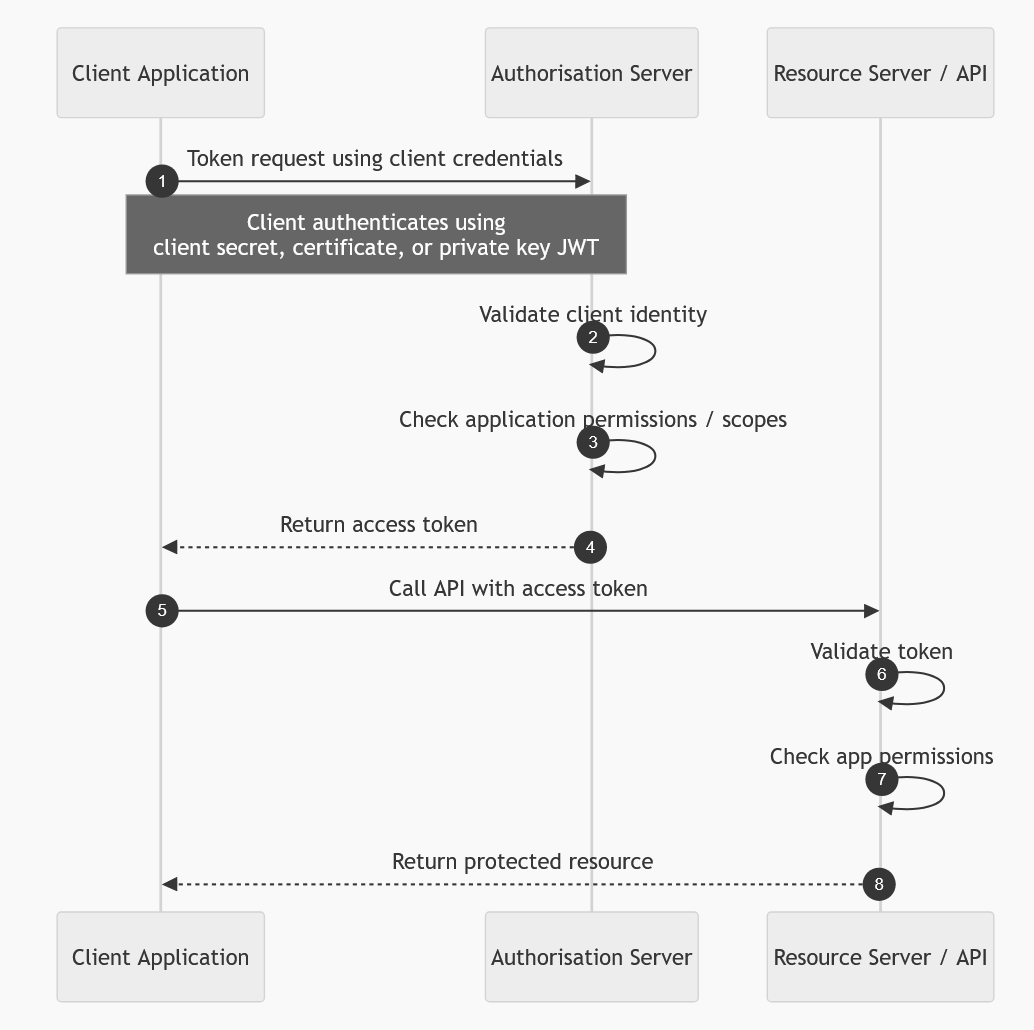
This is sometimes called two-legged OAuth, because only the client application and the authorisation server are involved. Microsoft describes this flow as allowing a confidential client to use its own credentials instead of impersonating a user when calling another web service. (Microsoft Learn)
Use it for
| Scenario | Fit |
|---|---|
| Backend service calling another backend service | Excellent |
| Scheduled jobs | Excellent |
| Daemon processes | Excellent |
| ETL or integration pipelines | Excellent |
| Application-level permissions | Excellent |
Avoid it when
| Scenario | Reason |
|---|---|
| Access must reflect the signed-in user | Use Authorisation Code, PKCE, or On-Behalf-Of |
| User-level row security or ABAC is required | Use a user-delegated flow |
| You need to know which user initiated the action | Client Credentials only represents the app |
A common mistake is using Client Credentials when the downstream system needs to enforce user-specific permissions. In that case, the API only sees the application identity, so it cannot naturally apply the user’s entitlements unless you build a separate impersonation or claims model.
On-Behalf-Of Flow
The On-Behalf-Of Flow, often shortened to OBO, is used when one API needs to call another API using the identity of the signed-in user.
For example, a user signs into a web app. The web app calls API A. API A then needs to call API B, but not as itself. It needs to call API B on behalf of the user. API A takes the incoming user token and exchanges it for a new access token for API B.
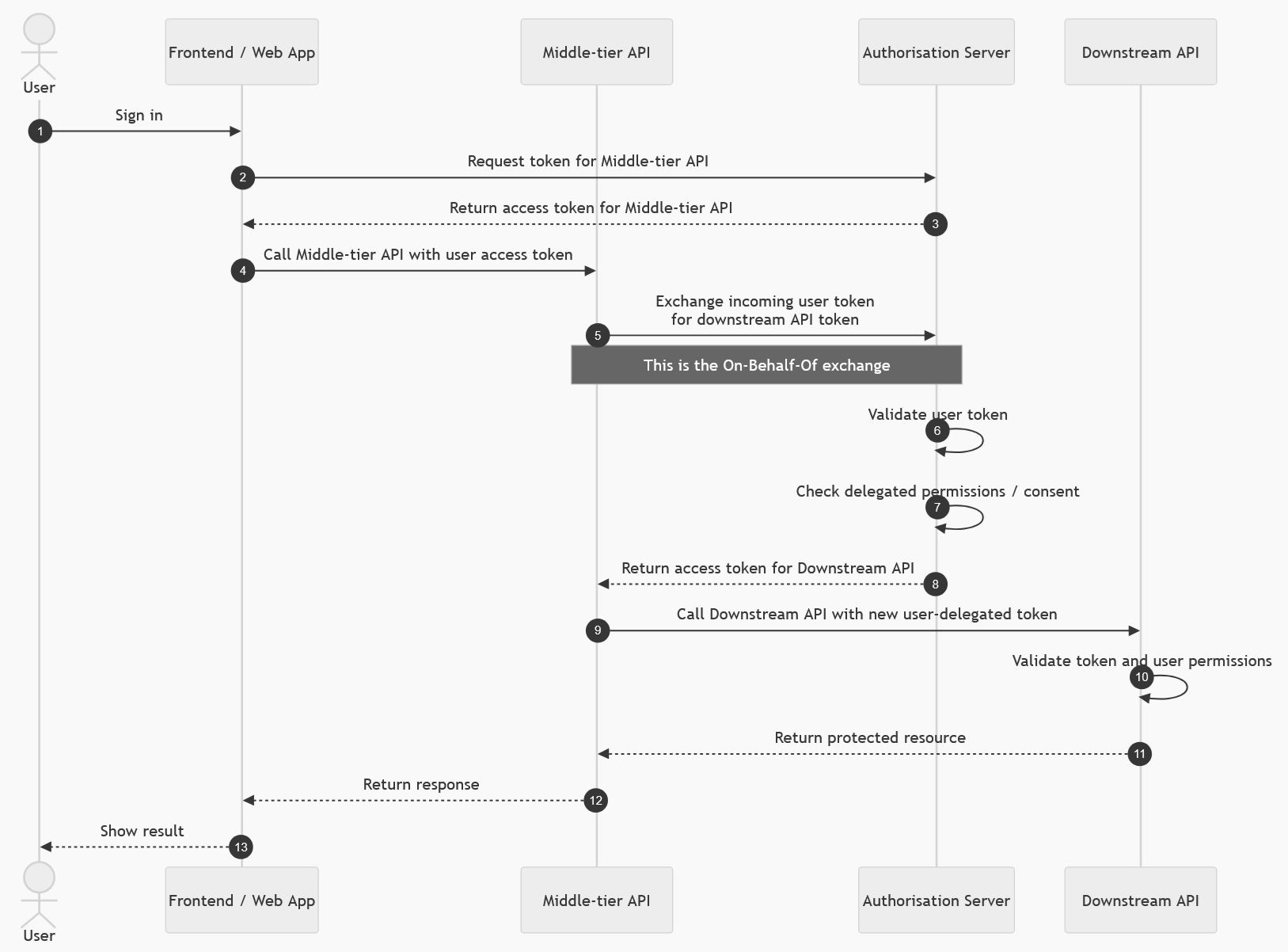
This is common in enterprise architectures where APIs are chained together and downstream services need to enforce the user’s permissions. Microsoft describes OBO as a delegated flow where a web API uses an identity other than its own to call another web API, passing the user’s identity and permissions through the request chain. (Microsoft Learn)
Use it for
| Scenario | Fit |
|---|---|
| Web API calling another API as the user | Excellent |
| Middleware API calling Microsoft Graph as the user | Excellent |
| API layer calling Databricks, Dynamics, or another protected API using delegated permissions | Good, where supported |
| User-specific access control is required downstream | Excellent |
Avoid it when
| Scenario | Reason |
|---|---|
| No user is involved | Use Client Credentials |
| Frontend app is calling an API directly | Use Authorisation Code with PKCE |
| Downstream API only supports app-only access | Use Client Credentials |
For your Databricks-style scenario, where the user’s own permissions, groups, or ABAC rules matter, OBO is usually the pattern to consider when a backend API sits between the web resource and Databricks.
Device Code Flow
The Device Code Flow is used when the device cannot easily support a normal browser-based login experience.
The device asks the identity provider for a device code and user code. The user is shown a short code and a URL. The user opens that URL on another device, such as a phone or laptop, signs in, and enters the code. Meanwhile, the original device polls the identity provider until sign-in is complete. Once approved, the device receives tokens.
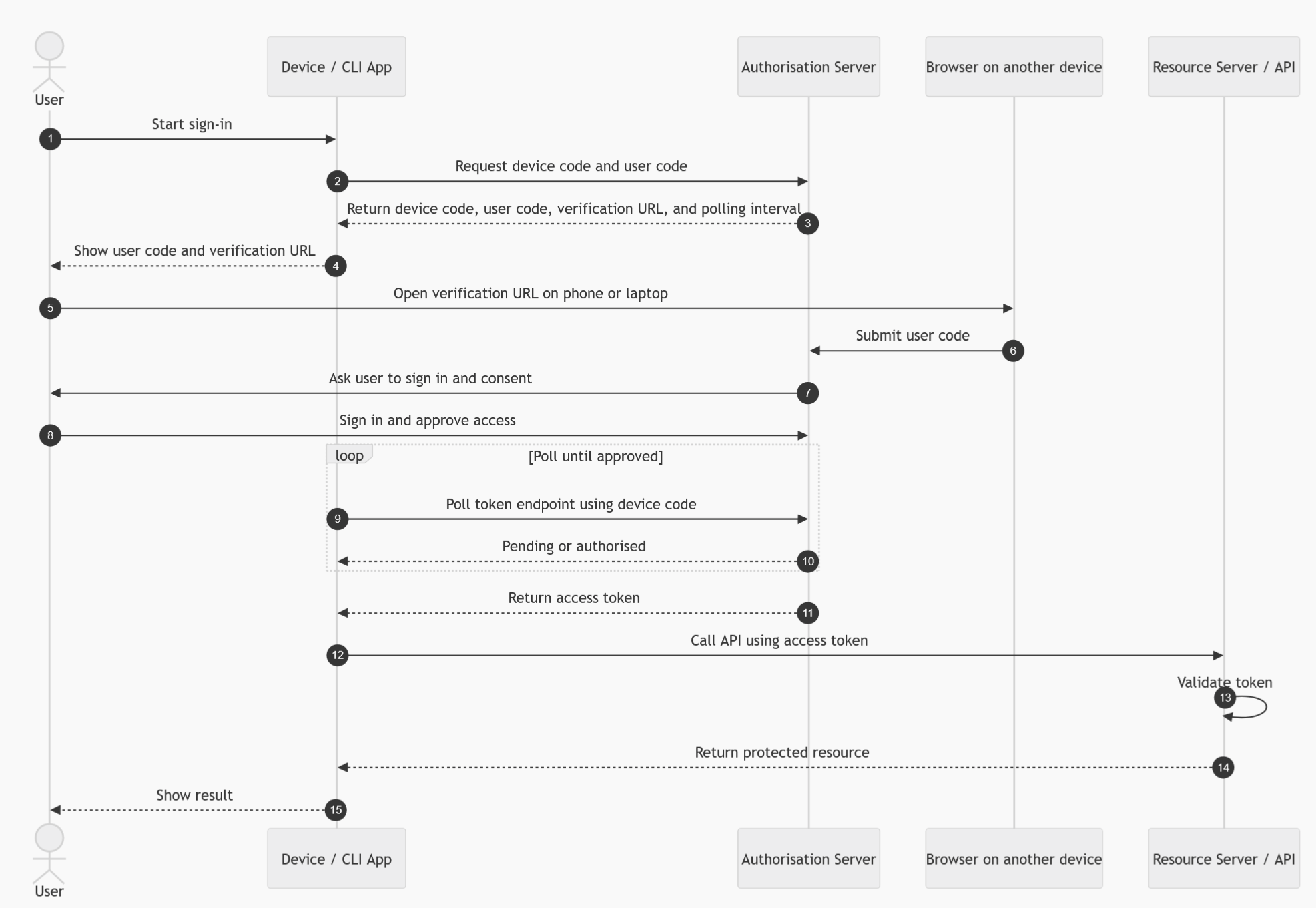
Microsoft describes this flow as suitable for input-constrained devices such as smart TVs, IoT devices, and printers, where interactive authentication requires another device with a browser. (Microsoft Learn)
Use it for
| Scenario | Fit |
|---|---|
| Smart TVs | Excellent |
| IoT devices | Excellent |
| Printers | Good |
| CLI tools | Good |
| Devices with limited keyboard/browser support | Excellent |
Avoid it when
| Scenario | Reason |
|---|---|
| Normal browser redirect is available | Use Authorisation Code with PKCE |
| Backend-to-backend integration | Use Client Credentials |
| High-friction UX is unacceptable | Use a more seamless interactive flow |
Refresh Token Flow
The Refresh Token Flow is used to obtain a new access token without asking the user to sign in again.
Access tokens are deliberately short-lived. When an access token expires, the application can use a refresh token to request a new access token from the identity provider. The user does not need to repeat the full sign-in process, provided the refresh token is still valid and has not been revoked.
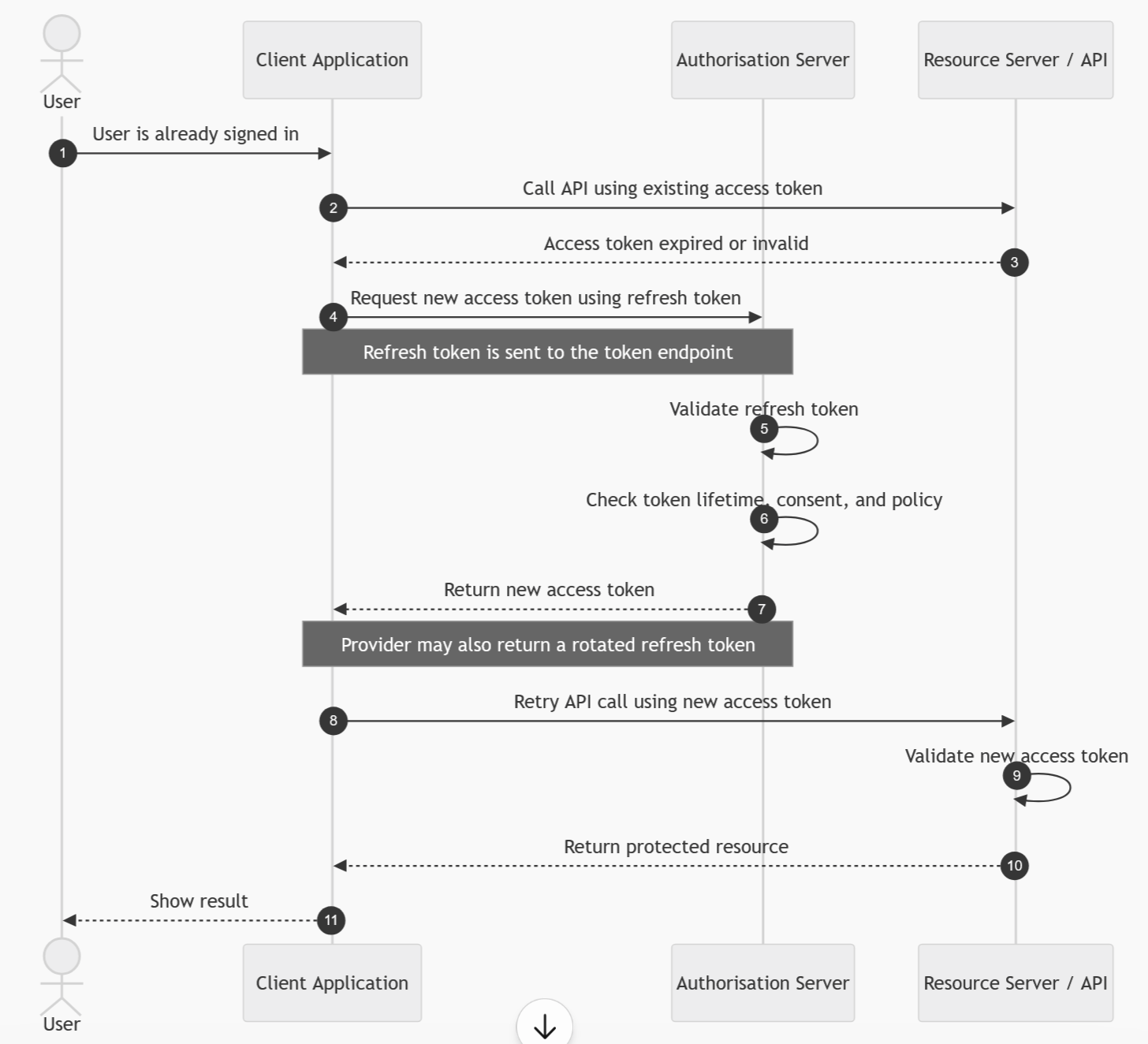
This is not normally the first flow a user interacts with. It is a continuation mechanism used after another flow, such as Authorisation Code or Authorisation Code with PKCE.
Use it for
| Scenario | Fit |
|---|---|
| Keeping a user signed in | Excellent |
| Long-running sessions | Good |
| Mobile and desktop apps | Good |
| Web apps with secure token storage | Good |
Avoid it when
| Scenario | Reason |
|---|---|
| You cannot store tokens securely | Risk of token theft |
| You only need short-lived access | Access token may be enough |
| Machine-to-machine access | Client Credentials can request new tokens directly |
Refresh tokens need careful handling because they can be used to obtain new access tokens. They should be stored securely, rotated where supported, and revoked when no longer needed.
Implicit Flow
The Implicit Flow was originally created for browser-based applications that could not securely store a client secret. Instead of returning an authorisation code, the identity provider returned an access token directly to the browser.
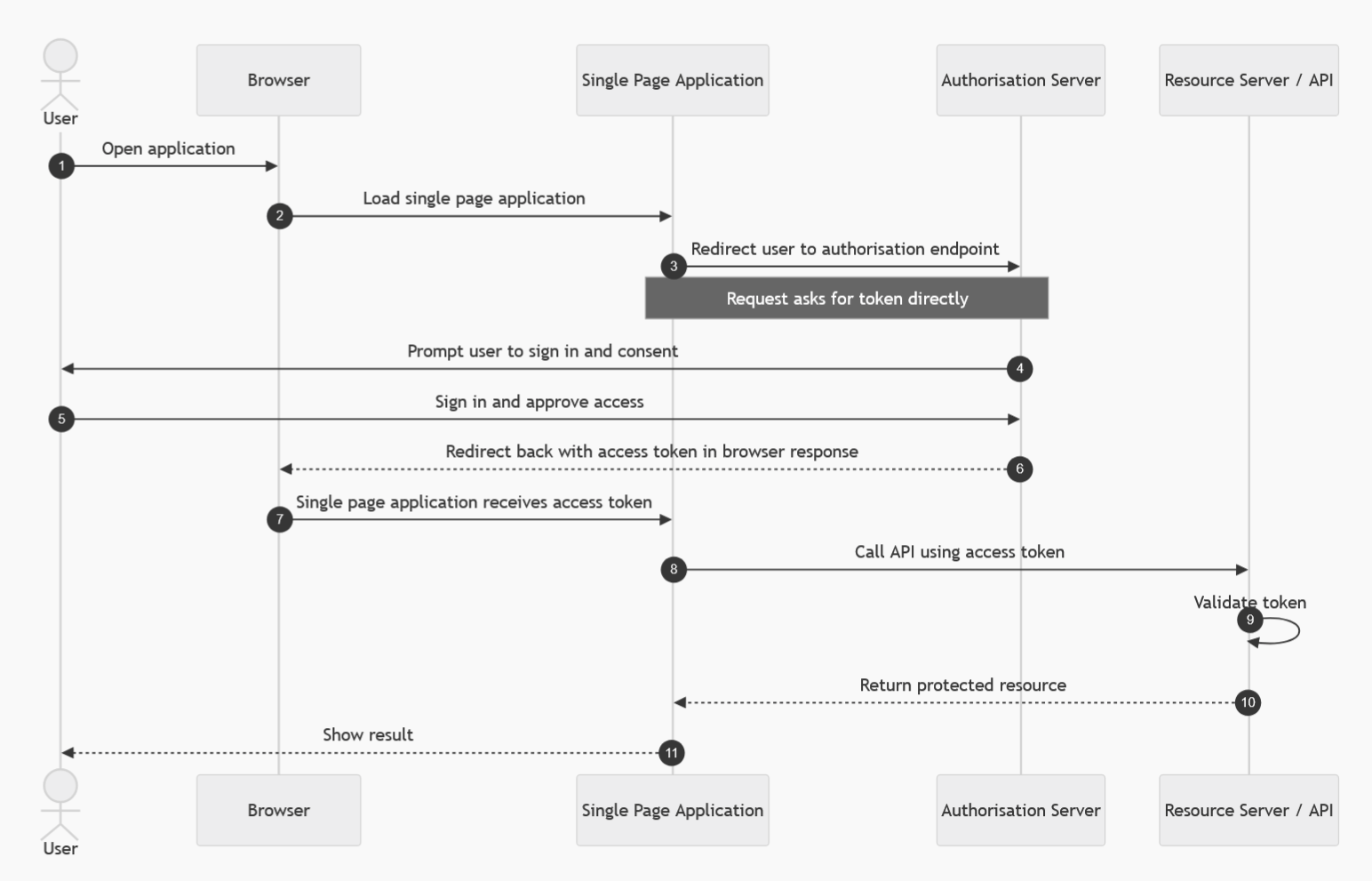
This is now considered outdated and insecure compared with Authorisation Code with PKCE. The issue is that tokens can be exposed through browser history, redirects, logs, or malicious scripts. Modern guidance recommends replacing Implicit Flow with Authorisation Code with PKCE. Microsoft also recommends avoiding the implicit grant for SPAs and using authorisation code with PKCE instead. (Microsoft Learn)
Use it for
| Scenario | Fit |
|---|---|
| New applications | Do not use |
| Legacy SPAs only | Only where migration is not immediately possible |
Avoid it when
| Scenario | Reason |
|---|---|
| Building a new SPA | Use Authorisation Code with PKCE |
| Security matters | Tokens are exposed to the browser directly |
| Refresh tokens are needed | Use modern PKCE-based patterns |
In modern designs, this flow should be treated as a legacy pattern.
Resource Owner Password Credentials Flow
The Resource Owner Password Credentials Flow, often called ROPC or the Password Grant, allows an application to collect the user’s username and password directly and exchange them for tokens.
This flow is strongly discouraged. It breaks the normal OAuth principle of redirecting the user to a trusted identity provider. It also prevents many modern security controls, such as strong MFA, conditional access, passwordless authentication, and federated sign-in experiences.
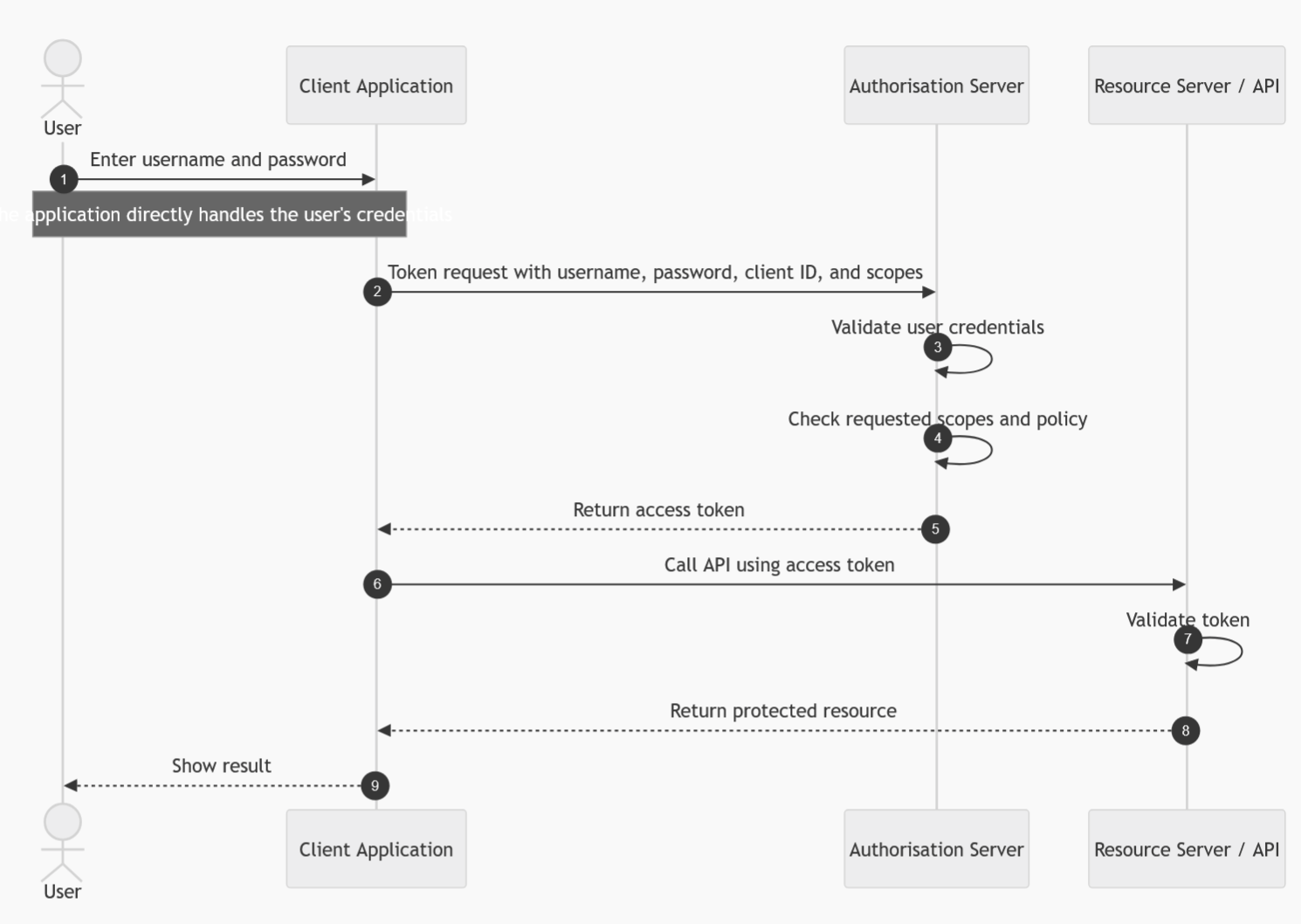
OAuth 2.1 excludes this flow, and current best practice is to avoid it except in rare legacy scenarios where no better option exists. The OAuth 2.1 draft notes that Resource Owner Credentials and Implicit grants are not specified in OAuth 2.1. (IETF)
Use it for
| Scenario | Fit |
|---|---|
| New applications | Do not use |
| Legacy first-party apps | Only as a temporary migration pattern |
| Highly trusted legacy systems | Only with strong justification |
Avoid it when
| Scenario | Reason |
|---|---|
| MFA is required | Often incompatible |
| Federated identity is used | Often incompatible |
| User passwords must not be handled by the app | Violates best practice |
| Modern SSO is required | Use Authorisation Code with PKCE |
JWT Bearer Flow
The JWT Bearer Flow uses a signed JSON Web Token as an assertion to request an access token.
Instead of using a browser redirect or username/password, the client presents a signed JWT to the authorisation server. The authorisation server validates the signature, issuer, audience, expiry, and claims. If valid, it issues an access token.
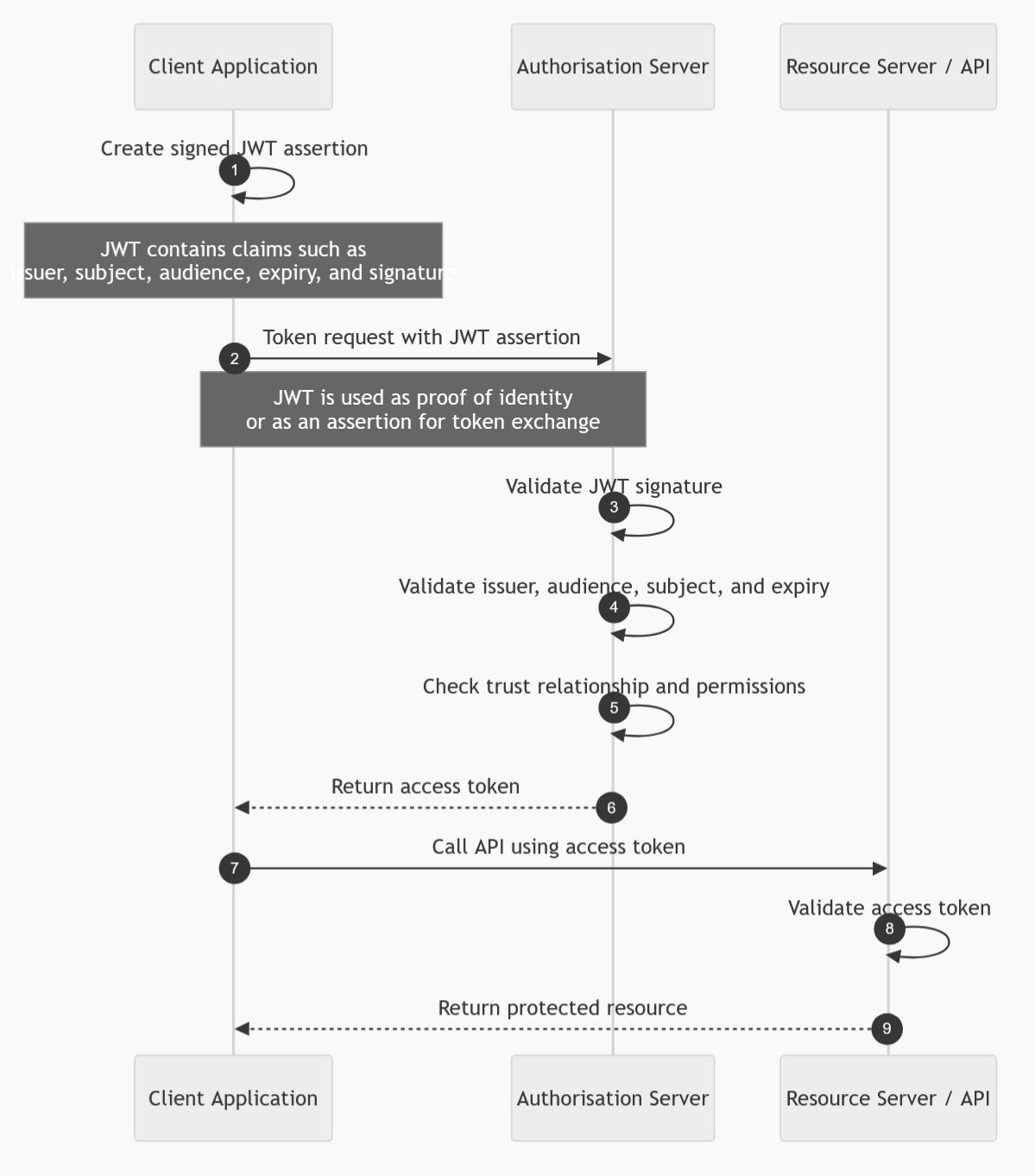
This is often used in assertion-based integration scenarios, workload federation, or systems where an external identity or trusted service needs to exchange a signed assertion for an OAuth token.
Use it for
| Scenario | Fit |
|---|---|
| Assertion-based authentication | Good |
| Workload identity federation | Good |
| Trusted service integration | Good |
| Token exchange scenarios | Good |
Avoid it when
| Scenario | Reason |
|---|---|
| Standard user login is needed | Use Authorisation Code with PKCE |
| Simple service-to-service access is enough | Client Credentials is usually simpler |
| You cannot manage signing keys securely | JWT assertion relies on key trust |
SAML Bearer Assertion Flow
The SAML Bearer Assertion Flow allows a SAML assertion to be exchanged for an OAuth access token.
This is mainly used in federation or legacy enterprise environments where SAML is already part of the identity architecture. A trusted identity provider issues a SAML assertion. The client presents that assertion to the OAuth authorisation server. If the assertion is valid, the server issues an OAuth access token.
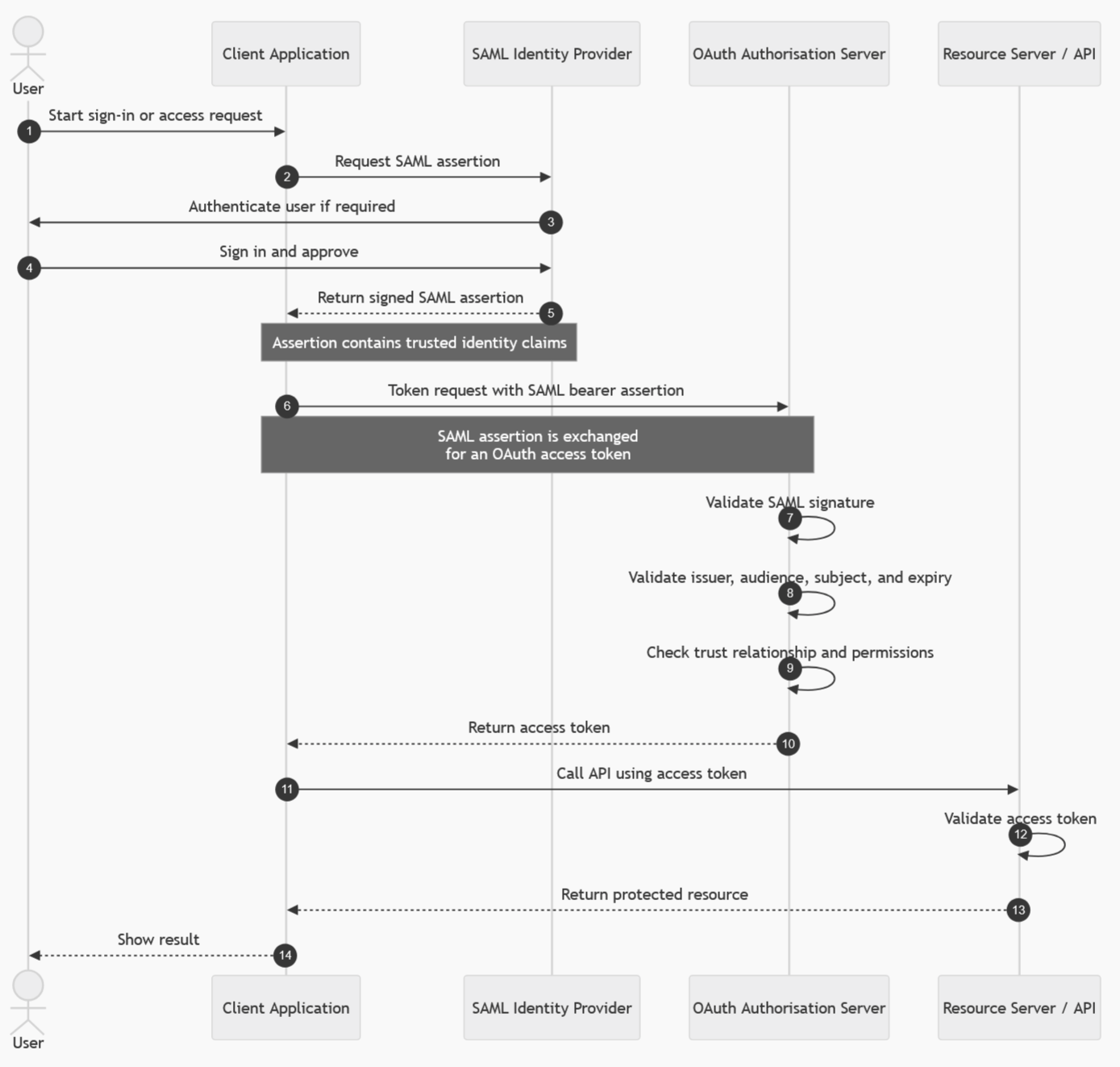
This flow is useful when bridging older SAML-based identity systems with newer OAuth-protected APIs.
Use it for
| Scenario | Fit |
|---|---|
| SAML federation integration | Good |
| Legacy enterprise identity systems | Good |
| Bridging SAML identity to OAuth APIs | Good |
Avoid it when
| Scenario | Reason |
|---|---|
| You are building a new modern app | Use OIDC/OAuth flows directly |
| No SAML infrastructure exists | Adds unnecessary complexity |
| Simple app-only access is required | Use Client Credentials |
Simple Decision Table
| Requirement | Best flow |
|---|---|
| User signs into a web app with backend | Authorisation Code |
| User signs into SPA, mobile, or desktop app | Authorisation Code with PKCE |
| Backend service calls another service without a user | Client Credentials |
| API calls another API as the signed-in user | On-Behalf-Of |
| CLI, TV, printer, or limited-input device | Device Code |
| Renew access after sign-in | Refresh Token |
| Legacy browser app returning token directly | Implicit, but migrate to PKCE |
| Legacy app collecting username/password | ROPC, but migrate away |
| Signed JWT assertion exchanged for token | JWT Bearer |
| SAML assertion exchanged for OAuth token | SAML Bearer |
Practical Rule of Thumb
For modern systems, start with these defaults.
| App type | Recommended flow |
|---|---|
| Web app with server backend | Authorisation Code with PKCE where supported |
| SPA | Authorisation Code with PKCE |
| Mobile app | Authorisation Code with PKCE |
| Desktop app | Authorisation Code with PKCE |
| Backend API calling another API as user | On-Behalf-Of |
| Service-to-service integration | Client Credentials |
| Device with limited input | Device Code |
The older Implicit and Resource Owner Password Credentials flows should be avoided for new designs. For most modern user-facing applications, Authorisation Code with PKCE is now the default secure choice.